

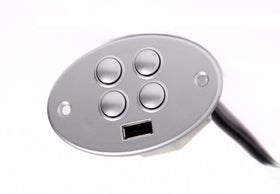

How to Test Your Power Recliner's Power Supply and Button Control
Fixing a recliner is a step-by-step process. It's not always a silver bullet, and sometimes it takes trial and error. In this two-part troubleshooting guide, we test the power supply first, then the button control.
Part 1: Test the Power Supply
Symptoms of a weak power supply
- The chair works intermittently: sometimes it works, sometimes it doesn't.
- The chair suddenly stops working and everything dies.
A green light doesn't always mean it's supplying full power. The power supply in the video should provide about 28 to 29 volts. If it doesn't, there isn't enough power to fully operate your recliner.
Check the cord
Unplug the two-pin connection at the back of the chair. If it's clamped, unclamp it and slide it out. Then look for common damage:
- Chewed by a pet. If the cord is chewed and could have a short, don't use it. It can damage your other components and cost you a lot more.
- Kinked or caught in the chair or a vacuum cleaner.
- Lost during a move.
Test with a voltmeter
Not everyone has a voltmeter, but if you do (or can borrow one), set it to test DC voltage (the V with a straight line on top) and check that the output matches the rated voltage on your power supply's label.
A note on the clamp
If someone trips on or kicks a clamped power cord, it can rip the whole cable out of the motor. That means replacing the motor, which is the most expensive piece in the chair. We've changed our minds on the clamp: as long as you plug it in tight and don't pull on it, it'll stay fine. It's up to you.
Part 2: Test the Button Control
Once you know the power supply is providing the right voltage, flip the chair to see the "guts." If it's reclined, flip it onto its side; if it's closed, you can also tip it onto its face. Get help if you need it.
Use the power supply light
A green light is good. A red or orange light usually means there's a short in the system, either in the motor or the button control.
- Find the button control's cable (it should run along the side, away from the mechanism) and unplug its five-pin connection.
- Go back to the power supply. If it turns green, the problem is your button or remote. Take a picture of the button's tag (sometimes on the back) and send it to us. The replacement comes with the whole wire.
- If it stays red with the button disconnected, you probably have a motor issue.
Shop replacement power supplies, replacement button controls and replacement motors.
Frequently Asked Questions
How many volts should a power recliner power supply put out?
The one in our video is rated about 29 volts. Check the label on yours and test DC voltage with a voltmeter.
What does a red or orange light on my power supply mean?
Usually a short in the system, either in the button control or the motor. Unplug the button to find out which.
Is it safe to use a chewed power cord?
No. A chewed cord can short and damage other, more expensive components.
Leave a comment