


Adjustable Bed Stuck Upright or Lost Your Remote? How to Find Your Control Box Info and Pair a New Remote
We get this question all the time: "My adjustable base is stuck in the up position and I can't fix it." Usually the remote is broken or lost. The dog ate it, it disappeared in a move. Here's how to get the right replacement and pair it.
Find Your Control Box Information
- Go to the underside of your adjustable base.
- Some bases have a velcroed vanity cover. Remove it to see the control box.
- Find the numbers on the side of the control box.
- Take a picture of the label, then zoom out and take one of the whole box. It's hard to get under there, so get both photos while you're there.
Send those to us and we'll know exactly which remote you need. Shop replacement adjustable bed remotes.
Pair Your New Wireless Remote
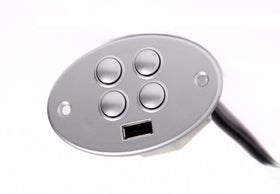
- Find the junction box under the bed, usually in the middle.
- Locate the button labeled pair, usually a small button on the side (sometimes recessed).
- Push the pair button and the coordinating buttons on your remote. Each remote pairs a little differently.
Not sure which remote to buy? See how to identify and replace your adjustable bed remote or browse replacement adjustable bed remotes.
Frequently Asked Questions
My adjustable bed remote is lost. How do I get a replacement?
Photograph the label on the side of the control box under the bed, plus the whole box, and send them to us.
How do I pair a new adjustable bed remote?
Press the pair button on the junction box under the bed, then the coordinating buttons on the remote.
Leave a comment